
Guide · AI and language
Prompt engineering: how it works, the building blocks and 14 prompts to copy
How to turn a vague request into an instruction that gets AI tools to deliver what you need, reliably. Prompt engineering in practice: the eight building blocks of a good prompt, a sorted prompt collection, style and role lists to look things up and the trick most people miss: letting the AI write the prompt.
In short
- A prompt is an instruction in natural language. The clearer the goal, context and format, the more predictable the result.
- Eight building blocks are all you need, from the goal to the constraints. They are not a checklist: a prompt only needs as many of them as its task requires.
- Style and role are your strongest levers. They tell the model which register of language to draw on.
- The quickest route to a good prompt: describe your goal and let the AI write the prompt for you.
- The real work starts after the first prompt. Follow-up prompts get out what the first attempt leaves behind.
- Save whatever has worked once as a skill, a project or your own GPT. From then on, one sentence does the job of a long prompt.
What prompt engineering is
Prompt engineering is the process of learning to phrase our instructions so that an AI tool gives us the most useful answers. The principle is simple: the better the prompts, the better the results. You don’t need to know how to code. You need to be clear about what you actually want.
Generative AI tools produce surprisingly good lucky hits even without any preparation, and they can take you a long way. But until you refine your prompts deliberately, luck is all it is. And you can’t plan a working day around luck: as soon as a result has to be reliable, you need control over what comes out.
First, because it holds many people back: you can’t break anything by experimenting. A prompt is a message, not an intervention in a system, and a poor result costs nothing but another try. Only one rule really matters: don’t enter confidential data into tools your company hasn’t approved. Everything else is a playground, and playing is the quickest way to get a feel for what works.
Why prompt engineering is like playing with Lego


The difference is obvious. A well-built prompt gives the tool precise instructions about what you expect, and the result is far more likely to be what you had in mind. You don’t have to be a programmer or a product designer for this: you just have to be able to follow the instructions, and often it is enough to take a good prompt from a collection and swap in the parts that fit your goal.
In prompt engineering, technical knowledge and programming languages matter less than meta-knowledge: knowing that instructions exist, how to find and adapt them and, above all, what exactly you want to achieve.
From a good prompt to your own tool
 This is where the real leap happens. A good prompt solves one task. It gets interesting when you stop writing it from scratch every time and instead record what the model needs to know about your work: your terms, your tone of voice, your audiences, your rules. The Lego robot on the box becomes a butler you can’t buy anywhere.
The common tools offer several ways to do this, all with the same aim:
| Option | What it does | Use it for |
|---|---|---|
| Custom instructions | An instruction that runs automatically in every chat, for example on tone, language or banned words. | Called system instructions, custom instructions or personalisation, depending on the tool |
| Projects | A workspace with its own files and rules. Anything you store there is available in every conversation. | Recurring work with fixed material, such as a product launch |
| Custom assistants | An assistant with a fixed role, fixed knowledge and a fixed workflow that you can share. | Custom GPTs, agents or assistants, depending on the provider |
| Skills | A saved capability: a sequence of steps the model applies again on request. | Turning a task that worked well once into a reusable procedure |
This pays off from the second repetition. And it is the difference between a tool anyone can use and one that knows your work.
Natural language as a programming language
A prompt can be almost anything: a question, a statement, a request, a whole dialogue. It is the input from which the AI generates an output. What matters is the language: unlike traditional programming languages with a fixed syntax, you communicate in your own. You don’t adapt to the machine; the machine adapts to you.
Details beat chance: the quickest way in
The most effective first step is almost too obvious: put the relevant details into the prompt. Models take instructions very literally. You get what you ask for, and usually only that.
| Prompt | What you get |
|---|---|
| “Write a text about shampoo.” | A generic text about shampoo. Usable as raw material, nothing more. |
| “Write a text for a landing page. It’s for our new organic shampoo, developed for dry hair. It contains aloe vera and coconut oil, is free from parabens and sulphates and comes in eco-friendly packaging.” | A text that uses the arguments you actually have and works as a draft. |
You can see the same effect with images. Two prompts, one difference: the amount of detail.
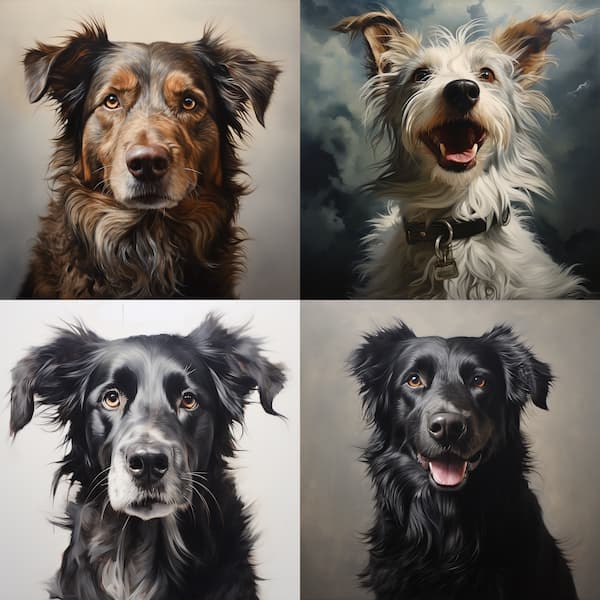

Neither image is bad. But only the second is a decision. The same goes for text: without details, a language model gives you its default answer, and default here means generic.
The eight building blocks of a good prompt
Almost all good prompts are clear and focused, no longer than necessary, and they steer the model through examples, format and style. The eight building blocks below are sorted by impact. They are explicitly not a checklist: a good prompt uses only as many as its goal requires. Too many instructions at once bury the important ones.
| Building block | What matters | Example |
|---|---|---|
| Goal | Say what you want to end up with. Specific enough for a useful result, open enough for the model to contribute something. | “Draft three subject lines for our newsletter” rather than “Help me with the newsletter” |
| Clarity and precision | Be unambiguous. Vague instructions produce results that are technically correct yet still miss the point. | “Cut it to 120 words” rather than “Make it shorter” |
| Context | Give background: audience, occasion, market, prior knowledge. Whatever you leave out, the model fills in itself, with average assumptions. | “The readers are buyers in plant engineering who don’t know us yet” |
| Examples over descriptions | One example of the result you want works better than three sentences of description. Two or three samples are enough for the model to pick up structure and tone. | “Here are two product descriptions we like: [Text 1], [Text 2]. Write the third with the same structure.” |
| Format | Specify the output: length, structure, language, table or running text. A fixed format saves half the editing. | “A table with three columns: term, problem, suggestion” |
| Language and style | Language, jargon and style shape the answer. You always set a style, whether you state it or not. | “Matter-of-fact, like technical documentation, no marketing language” |
| Constraints | Say what must not appear. Use them sparingly: too many bans take attention away from the goal. | “No invented figures. If you’re missing information, write [OPEN].” |
| Adaptability | Build the prompt so you can swap out individual parts. That turns a one-off instruction into a template. | Placeholders such as [product], [audience], [number] instead of fixed details |
What has changed from the classic list: “Examples over descriptions” is new and deliberately near the top. A single sample of the result you want is more reliable than any description. “Format” has replaced the old point “Length”, because length is only part of it, and “Keywords” has been folded into “Language and style”, where it belongs.
A prompt collection to copy
14 prompts for recurring tasks, each with placeholders in square brackets. Replace the highlighted parts and leave the rest as it is. The buttons below take you straight to the area you need.
A note on language variety: models default to whichever English they see most, which is usually American. If your text should follow British spelling and conventions, say so in the prompt. That is why several examples include “British English”; change it to American English if you write for the US.
Research and analysis
Competitor analysis
ResearchYou are a market analyst. Look at our competitor’s website [URL]. Compare their value proposition, how they address their audience and their pricing logic with our site [URL]. Output: a table of five points where we should catch up, each with a one-sentence rationale. At the end, tell me which claims you couldn’t verify.
Improved: a role, two sources to compare, a fixed output format and a request to disclose gaps in knowledge. That lowers the risk of invented claims.
Sharpen your target audience
AnalysisDescribe the main target audience for [product] in [market]. Base it on these details: [short description, price, sales channel]. Output: three short profiles, each with their job, goal, biggest obstacle and the question that must be answered before they buy. No demographic clichés, no invented studies.
Why it works: the constraint at the end rules out the usual platitudes.
Review an existing text
AnalysisCheck the following text for three things: unclear statements, unsupported claims and repetition. Answer as a list, with a quote and a suggested fix for each issue. Don’t rewrite the text. Text: [paste here]
Writing and content
Content ideas
ContentYou are the content manager at a manufacturer of [product category]. Suggest four blog topics that answer our customers’ questions and lead to our products. For each topic: working title, search intent in one sentence, three outline points. No topics we have nothing of our own to contribute to.
Improved on the earlier version: the prompt now states the search intent instead of “SEO-optimised”. That produces more useful suggestions than the buzzword.
Landing page copy
ContentWrite the opening of a landing page for [product]. Audience: [description]. Benefit: [one sentence]. Proof: [figure, reference or certificate]. No more than 90 words, British English, address the reader directly, one idea per sentence. No superlatives, no words such as “innovative”, “seamless” or “tailored”.
Tip: a list of banned words in the prompt is the quickest way to copy that doesn’t sound like AI.
Shorten a text
ContentCut the following text to [number] words without dropping any facts. Keep the technical terms, replace filler words, break up long sentences. Then tell me in one sentence which piece of information you would sacrifice next if it had to be shorter still. Text: [paste here]
Email and campaigns
Revise an email campaign
CampaignHere is the current copy of our email campaign: [paste text]. Audience: [description]. Goal: [clicks, replies, meetings]. Revise the copy so the benefit comes in the first sentence and only one call to action remains. Give me three subject lines under 50 characters and justify each in a few words.
Improved: one goal instead of two, a fixed character count for the subject line and a rationale to help you decide.
Social media post
CampaignYou are responsible for our social media channels. Draft three versions of a LinkedIn post about [topic]. Context: [occasion, audience, link]. Version 1 matter-of-fact, version 2 with a practical example, version 3 opening with a question. Each no more than 700 characters, no strings of hashtags, no emojis.
Language, terminology and markets
Enforce your terminology
TerminologyWrite [type of text] on [topic]. Use only the following terminology: [term = spelling, one per line]. Banned terms: [list]. If you’re missing a term, mark the spot with [TERM?] instead of inventing one.
This is the prompt that saves the most time in everyday business. A glossary in the prompt keeps product names and technical terms consistent, even across many texts.
Carry over your tone of voice
StyleHere are three texts that capture our tone of voice well: [Text 1], [Text 2], [Text 3]. First, describe in five bullet points what these texts have in common. Then write [new text] in the same tone. Stick to your bullet points and don’t slip into a promotional tone.
Why two steps: the model describes the style itself first, so it then has it as an instruction.
Check a raw translation
TranslationCompare the source text and the translation section by section. Flag only: missing content, wrong figures and units, inconsistent terminology, passages that need different wording in the target market. Format: a table with source text, translation, finding, suggestion. Don’t retranslate anything.
Important: this prompt finds points to check; it doesn’t replace specialist translation. A professional makes the call, see post-editing.
Adapt a text for another market
LocalisationAdapt the following text for [target market]. Check: units of measurement, date and number formats, currency, examples, tone and forms of address, legal disclosures. List all changes with reasons before you output the new text. Text: [paste here]
There is more on this in our guide to translation and localisation.
Roles and perspectives
Let an expert answer
RoleAnswer as [role, e.g. marketing controller, civil engineer, head of purchasing]. Task: [question or assignment]. Name three points that non-specialists overlook in this context and justify each in one sentence.
The principle behind it: the role determines the vocabulary the model draws on. It is the quickest way to get the jargon right.
Test it on a sceptic
RoleYou are a sceptical buyer reading the following text for the first time. Ask the five questions you would ask before making an enquiry. Then mark the places in the text that leave these questions unanswered. Text: [paste here]
More useful than praise: taking the reader’s role reveals gaps you can no longer see yourself.
Style and role: your strongest lever
Language models have learned from huge amounts of text which phrasings are usual in which context. When you specify a style or a role, you tell the model which of these areas to draw on. In other words, you choose the language of the answer: not just English or German, but also the language of a specialist field, of reportage or of a children’s book.
The language in your prompt works like a map. Write in marketing terms and the model answers in marketing terms. Ask for the perspective of a civil engineer and it reaches for the matching vocabulary. And you always set a style, whether you mean to or not: if you don’t name one, the model simply picks up the tone of your own input.
Length: two kinds of model, two rules
With text models, plenty of context helps. With image models, the opposite is often true, as these two attempts show. First, a very detailed prompt:


The first image is missing the sweater, the necklace and the walking stick, even though they were in the prompt: too many details, and the important ones get lost. The result was also “highly realistic” but not a photograph, because nobody had asked for one. Models guess when you leave it to them. In the second prompt, “holding a walking stick” comes near the start and “photography” has been added. Same idea, different priorities, different result.
One word, nine results
The principle is clearest when everything stays the same and only the style changes. The same sentence nine times, with one word swapped each time:
 PromptBarbara Kruger style image of a woman talking with a robot
 PromptDe Stijl style image of a woman talking with a robot
 PromptHighly realistic image of a woman talking with a robot
 PromptPointillist style image of a woman talking with a robot
 PromptASCII image of a woman talking with a robot
 PromptRococo style image of a woman talking with a robot
 PromptMinimalist style image of a woman talking with a robot
 PromptPolaroid style image of a woman talking with a robot
 PromptArt Nouveau style image of a woman talking with a robot
The creativity here doesn’t happen during generation but long before it: when you come up with the subjects, styles and words. And afterwards, when you choose. Which of the four or forty results works, and why? Which wording do you keep? The thinking stays with us; it just moves into the preparation and the follow-up.
For reference: styles, authors, visual languages
The lists below are there for exactly the moment when the right word escapes you. Open a list, copy a term, drop it into your prompt.
Writing styles for text models 40
Add the style to your prompt, for example “Write the opening in the style of a crime novel”.
- Humorous
- Sarcastic
- Ironic
- Romantic
- Detective story
- Adventurous
- Scientific
- Philosophical
- Lyrical
- Epic
- Dramatic
- Tragic
- Comic
- Satirical
- Mystical
- Imaginative
- Realistic
- Surrealist
- Horror
- Thriller
- Crime novel
- Western
- Science fiction
- Fantasy
- Fairy tale
- Young adult
- Children’s book
- Dystopian
- Utopian
- Steampunk
- Cyberpunk
- Gothic
- Noir
- Postmodern
- Expressionist
- Impressionist
- Futuristic
- Minimalist
- Baroque
- Rococo
Authors as style models 40
Ask for it in your prompt, for example: “Write the introduction in the style of [name].” The style is the inspiration; the message stays yours.
- William Shakespeare · poetic and dramatic, for texts that call for elegance
- Jane Austen · sharp and elegant, for pointed campaigns
- Charles Dickens · detailed and socially critical, for social issues
- Mark Twain · humorous and sarcastic, for light-hearted ad copy
- F. Scott Fitzgerald · lyrical and descriptive, for luxury brands
- Ernest Hemingway · clear and direct, for short, punchy messages
- Leo Tolstoy · epic and philosophical, for reflective texts
- George Orwell · critical and dystopian, for texts that inform and expose
- Agatha Christie · suspenseful and puzzling, for teasers and cliffhanger campaigns
- Virginia Woolf · flowing and introspective, for emotional texts
- James Joyce · complex and modernist, for avant-garde formats
- Herman Melville · profound and allegorical, for epic narratives
- Oscar Wilde · witty and satirical, for pointed creative copy
- Emily Dickinson · lyrical and condensed, for poetic formats
- Franz Kafka · surreal and allegorical, for reflective texts
- Fyodor Dostoevsky · psychological and profound, for introspective texts
- John Steinbeck · realistic and socially critical, for documentary formats
- H. G. Wells · futuristic and speculative, for visionary topics
- Edgar Allan Poe · dark and mysterious, for suspenseful formats
- The Brontë sisters · romantic and dramatic, for emotional texts
- J. K. Rowling · magical and inventive, for family-friendly formats
- Stephen King · gripping and unsettling, for suspense formats
- George R. R. Martin · complex and detailed, for long story arcs
- Paula Hawkins · gripping and psychological, for layered texts
- Dan Brown · puzzling and historical, for cultural topics
- Khaled Hosseini · emotional and cultural, for narrative formats
- Chimamanda Ngozi Adichie · cultural and feminist, for social issues
- Yuval Noah Harari · analytical and historical, for explanatory texts
- Malcolm Gladwell · insightful and analytical, for knowledge formats
- Neil Gaiman · imaginative and mythical, for creative formats
- Margaret Atwood · dystopian and critical, for visionary topics
- Jodi Picoult · emotional and topical, for stories about society
- Haruki Murakami · surreal and lyrical, for dreamlike texts
- Isabel Allende · magical realist and cultural, for narrative formats
- John Green · youthful and emotional, for young audiences
- Nicholas Sparks · romantic and heartfelt, for emotional texts
- Zadie Smith · contemporary and cultural, for modern formats
- Toni Morrison · profound and cultural, for reflective texts
- Salman Rushdie · complex and allegorical, for intellectual formats
- Joan Didion · cool and precise, for observational texts
Art styles for text-to-image models 50
Put the term into your prompt, for example “impressionist painting of …” or “…, isometric illustration”.
- impressionism
- expressionism
- surrealism
- abstract expressionism
- pop art
- futurism
- dadaism
- fauvism
- art deco
- post-impressionism
- neo-impressionism
- symbolism
- photorealism
- neo-expressionism
- constructivism
- suprematism
- bauhaus
- op art
- hard-edge painting
- colour field
- tachisme
- lyrical abstraction
- conceptual art
- street art, graffiti
- psychedelic art
- lowbrow art
- pixel art
- vaporwave aesthetics
- cyberpunk style
- steampunk style
- gothic style
- baroque style
- byzantine style
- mannerism
- pre-raphaelite
- neoclassicism
- precisionism
- glitch art
- hyperrealism
- kawaii art
- zine culture aesthetics
- brutalist design
- generative art
- ASCII art
- net art
- post-internet art
- isometric illustration
- flat design
- risograph print
- technical blueprint drawing
Visual signatures to try out 50
Add the name to your prompt or put “in the style of …” before it, for example “photograph of the North Sea, in the style of Ansel Adams”.
- Ansel Adams · black-and-white landscape photography
- Cindy Sherman · conceptual self-portraits
- Stanley Kubrick · symmetrical composition
- Wes Anderson · symmetry and pastel colours
- Salvador Dalí · surreal dreamscapes
- Diane Arbus · intimate portraits
- Akira Kurosawa · epic narrative images
- Frida Kahlo · expressive self-portraits
- Gregory Crewdson · cinematic suburban scenes
- Yayoi Kusama · infinite dot patterns
- Henri Cartier-Bresson · street photography at the decisive moment
- David Lynch · surreal, dreamlike scenes
- Banksy · street art with a message
- Vivian Maier · street photography of everyday life
- Pedro Almodóvar · bold colours
- Georgia O’Keeffe · large-format flowers and deserts
- Andrei Tarkovsky · long, meditative shots
- Robert Mapplethorpe · high-contrast black-and-white studies
- Jean-Michel Basquiat · graffiti-like painting
- Christopher Nolan · complex, cool imagery
- Helmut Newton · striking fashion photography
- Ai Weiwei · political installations
- Sofia Coppola · soft light, isolation
- Andy Warhol · pop art screen prints
- Terrence Malick · backlit nature imagery
- Dorothea Lange · documentary portraits
- Damien Hirst · spot paintings, conceptual art
- Wong Kar-wai · melancholic colour palettes
- Richard Avedon · pared-back portraits
- James Turrell · light spaces
- Barbara Kruger · text and image collages
- Martin Scorsese · dense big-city imagery
- Edward Hopper · lonely figures in architecture
- Alfred Hitchcock · suspense through perspective
- Jeff Wall · staged everyday scenes
- Jean-Luc Godard · French New Wave aesthetics
- Annie Leibovitz · staged portraits
- David Hockney · flat colour and swimming pools
- Federico Fellini · surreal settings
- Bill Viola · video installation, slow motion
- Joel Meyerowitz · colour street photography
- Yasujirō Ozu · calm, low-angle shots
- Jenny Holzer · text-based works
- Sergio Leone · wide shots and close-ups
- Shirin Neshat · photography with calligraphy
- Robert Frank · raw documentary photography
- Saul Leiter · colour photography through glass and rain
- Hilma af Klint · early abstract forms
- Katsushika Hokusai · Japanese woodblock prints
- Paul Klee · playful shapes and lines
Let the AI write the prompt
The most useful trick is also the most often overlooked: you don’t have to write the perfect prompt yourself. Describe in everyday language what you want to achieve and have a prompt written for you. The model knows better than any guide which information it needs, and it will ask for whatever is missing.
A prompt for the prompt (meta-prompt)
BasicsI want to use an AI tool to [goal in everyday language]. Write me a prompt for it. First, ask me for everything you need: audience, context, format, length, tone and anything that must not appear. Then give me the finished prompt as a block I can copy, and explain in three bullet points why it is built that way.
How to use it: answer the follow-up questions briefly and honestly, even with “I don’t know yet”. Save the finished prompt in your own collection, so it is ready to hand next time.
Get an existing prompt improved
CritiqueHere is my prompt: [paste prompt]. Assess it on six points: role, goal, context, material, format, constraints. For each point, say what is missing or ambiguous. Then give me an improved version without changing my content requirements.
Useful when a prompt almost works and you can’t tell why. Assessing it against the six parts usually shows the gap straight away.
Build a template for recurring tasks
ToolkitWe regularly write [type of text] for [audience]. Turn this into a reusable prompt template with placeholders in square brackets. The template should include role, goal, context, format and constraints. It should work for similar cases without changes. At the end, name the three placeholders that will need adjusting most often.
This turns a one-off prompt into a tool you can pass around your team.
A tip from practice: check the generated prompt before you run it. Models like to add assumptions you never made, such as an audience or a tone. Delete whatever isn’t right, and the prompt becomes a real template.
Six tricks you rarely find in guides
The building blocks cover the structure. These six points decide how good the result really is in everyday use.
| Trick | Why it works |
|---|---|
| Outline first, then the text | Ask to see the structure first and approve it. The wrong structure costs more time than any wording. |
| Say what you want, not just what you don’t | Bans alone produce bland results. One example of the tone you want works better than five bans. |
| Ask for criticism, not agreement | Models agree too readily. Ask explicitly: “What are the arguments against this?” or “Where is the text weak?” |
| Have gaps flagged | Ask the model to mark anything uncertain, for example with [OPEN] or [SOURCE?]. That separates what is known from what is guessed before you use it. |
| Restart long conversations | After many rounds, answers drift. Have the current state summarised and start again with that summary. |
| Two options, not one | Ask for two different solutions, each with a one-sentence rationale. Comparing is easier than judging. |
Follow-up prompts: the work starts after the first attempt
The real strength of chat-based tools is the dialogue. A follow-up prompt is simply an answer to the answer: you say what worked and what missed the goal, and you shape the result step by step. Four types cover almost every case.
Analysis prompts
Follow-upAssess and compare content and suggestions
“What are the strengths and weaknesses of the first three suggestions?” · “How do the two campaigns differ in the way they address the audience?”
Feedback prompts
Follow-upGet an assessment of a text or an idea
“How effective is the call to action in this newsletter, and why?” · “Rewrite it, simpler this time, without repetition or clichés.”
Expansion prompts
Follow-upGo deeper or generate variations
“Ten more ideas that are clearly different.” · “20 headlines, ranked by how well they are likely to land with the audience.”
Clarification prompts
Follow-upMake complex things easy to understand
“Explain this to someone with no IT background.” · “Explain it with an everyday example.”
With image models, the same principle works differently: instead of discussing, you vary the prompt, swap individual words or move important details to the front. That is a dialogue too, just a one-sided one.
From prompt to skill: build it once, use it every time
This last step is the one most often skipped. Once a task has gone well, don’t save the prompt in a document; save the procedure in the tool itself. After that, one sentence is enough: “Do it the usual way for our product descriptions.”
Most tools now offer a way to do this, under various names: saved skills, projects with their own rules, custom assistants or persistent instructions. What they have in common is that they store three things you would otherwise type again every time: the role, the material and the procedure.
Turn a successful run into a skill
SkillThat worked well. Summarise the procedure we just used as a reusable workflow: what role you take on, what information you need from me, the order you work in and how you check the result. Write it so I can save it and call it up with one sentence next time. Call the workflow [name].
Then: save the answer as a skill, as project instructions or in your own assistant. Next time, the name is all you need.
This is the point where the tool becomes a colleague who knows your work. And it is why the effort of writing a good prompt pays off: you write it exactly once.
Two things to bear in mind. First, document what goes into a skill, or in six months nobody will know why the results look the way they do. Second, before sharing a skill, check that no confidential details have ended up in it, such as client names from the sample material.
Limits, confidentiality and quality
Prompt engineering makes results more predictable, not more true. Three things remain your job: checking the facts, setting the terminology and deciding what may be entered into a tool in the first place.
| What to watch | Why |
|---|---|
| Invented information | Models phrase false statements just as fluently as true ones. Figures, standards, quotes and sources need checking before a text leaves the company. |
| Terminology | Without guidance, the model picks any variant. A glossary in the prompt keeps product names and terminology consistent. |
| Confidentiality | Customer data, contracts and unpublished figures belong only in tools your company has approved, ideally with a data processing agreement and no training on your inputs. |
| Language varieties | British or American English, German for Germany, Austria or Switzerland: when it matters, put the variety in the prompt. |
| Labelling | Transparency obligations apply to certain AI-generated content. What that means for text is covered in our guide to proofreading AI texts. |
| Publication | The more visible a text, the more it pays to have a professional edit it. For translations, that means post-editing. |
For texts that will be published or translated, the next step is proofreading AI texts and post-editing to ISO 18587.
To take away
Both PDFs contain the content of this page in a format you can print and share with your team. They are currently available in German only.
Prompt library and cheat sheet
Prompt library: all 14 prompts from this page, sorted by occasion, with placeholders and notes.
Prompt library as a PDF (German)
Cheat sheet: one page with the building blocks, the anatomy of a prompt, the meta-prompt and the four types of follow-up.
Frequently asked questions
What is prompt engineering?
Prompt engineering is the work of shaping the instruction you give an AI tool. You phrase the goal, context, format and limits so that the result becomes predictable. The principle: the clearer the prompt, the more useful the answer.
What is a prompt?
A prompt is an instruction in natural language. It can be a question, a task, an extract of text with an editing request or a whole dialogue. You don’t need any programming knowledge.
What does a good prompt look like?
It states the role, goal, context, material, format and constraints, but only as much of each as the task needs. Less is often more: too many instructions bury the important points.
Can the AI write my prompt for me?
Yes, and it is one of the most useful tricks there is. You describe your goal in everyday language and have a full prompt written from it, which you then check and reuse. The template for this is on this page.
Do the prompts work in other tools too?
The principles apply to all common text models, such as ChatGPT, Claude, Gemini or Copilot, and to image models as well. The difference is length: text models handle plenty of context, while image models work best with short, dense descriptions.
Can I enter customer data into an AI tool?
Only if your company allows it and has a data processing agreement with the provider. Also check whether your inputs are used for training. If in doubt, anonymise names, figures and product names before you paste in a text.
Terms on this page
- Prompt
- An instruction in natural language to an AI tool. It determines what is generated and in what form.
- Large language model (LLM)
- A language model that has learned from very large amounts of text which word sequences are likely. The basis of tools such as ChatGPT, Claude or Gemini.
- Natural language processing (NLP)
- The branch of computer science concerned with how machines process human language. It is what allows a prompt in everyday language to work.
- Text-to-image model
- A model that generates an image from a text description, such as Midjourney, Stable Diffusion or the image features of the major chat tools.
- Token
- The smallest unit a model processes, usually part of a word. The length of prompts and answers is measured in tokens.
- Hallucination
- An invented statement that reads fluently. The most common reason AI-generated text needs expert review.
More guides
-
AI and language
Proofreading AI texts
Which mistakes AI makes, which checks are needed and what the AI Act requires.
-
For business
Translation or localisation?
Which content needs which level, with a decision table and checklist.
-
Service
Post-editing to ISO 18587
Machine pre-translation, checked by specialist translators.